MaKe: fire hydrant map
A Flutter map app that helps my volunteer fire brigade find fire hydrants fast from a moving vehicle, on Windows computers and Android tablets.

Juho Torkkeli
· Updated
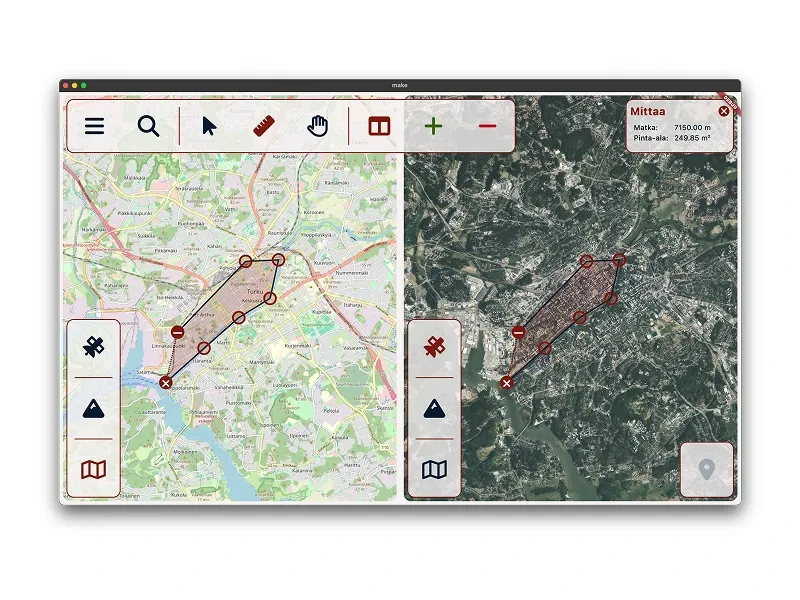
MaKe is a map app for finding fire hydrants fast. I built it to replace the old app our unit used, which had become hard to use, especially in a moving vehicle.
Overview
My volunteer fire brigade specializes in on-site water supply. In urban areas, fire hydrants are a critical part of that work, and we need to find them quickly and reliably.
We had been using an older app for this, a MapInfo viewer from Pitney Bowes, but it had become outdated and hard to use, especially for new members. It had lots of small buttons that are hard to hit in a moving vehicle. It forgot its settings between restarts, so you had to set them again every time. And updating its data needed a paid license.
The new app had to run on Windows 10 and 11, while I develop on macOS.
How I built it
The goal was a clean interface that works without an instruction manual. The main decisions:
- Split view: the same location in two maps side by side, for example the terrain map and aerial imagery.
- Local data: hydrant and address data are stored in a local database, so they work without a network connection. Map tiles are not cached.
- Address search: a local search with separate fields for street, house number and municipality that showed the five best matches as you typed, which made entering an address much faster.
- Measuring: one simple tool for both distances and areas.
Result
The app is fast and easy to use, and both new and experienced members have received it well. Hydrants are clearly visible on the map and clustered, so panning and zooming stay smooth. Using it in practice has also produced several ideas for new features.
Next steps
This section describes the state in December 2024. See the update below.
- Synchronize data across multiple units.
- Add new hydrants through the app.
- Edit hydrant information.
Tech
- Flutter and Dart: Windows and macOS from the start, iOS and Android since May 2026
- flutter_map with OpenStreetMap and National Land Survey of Finland open map tiles
- flutter_map_supercluster for marker clustering
- Isar as the local database (the community fork since May 2026)
- flutter_bloc (Cubit) and freezed for state
- window_manager for the desktop window
- Python and Dart scripts, plus QGIS, for converting the hydrant data
- OpenStreetMap buildings through the Overpass API for the address index (since May 2026)
Update (Sep 30, 2026): mobile, step-by-step search and what’s next
MaKe has now been in use for about two years. It runs in all of our unit’s vehicles, on Windows computers and Android tablets, and it has replaced the old app. People are generally happier with it because it’s simpler and easier, so everyone can use it.
What changed in 2025 and 2026:
- December 2025: new hydrant data and parsers, and markers colored by type. Tapping a hydrant opens a popup with its type and buttons to copy its coordinates or the nearest address. I fixed the area and length calculations: the screenshot above shows the old version, and its 249.85 “m²” is really hectares. Municipalities got autocomplete.
- March 2026: the address search became step by step. You pick the municipality (the top five suggestions appear as you type), then the street, then the house number, and it all works from the keyboard. The app also got an icon and a splash screen.
- May 2026: iOS and Android builds with GPS location and a button that centers the map on you. The Android version runs on the tablets in our vehicles. The address index now combines OpenStreetMap buildings with address data from Finnish public agencies.
Hydrant, municipality and address data are still stored on the device, so search works offline. Map tiles are still not cached, because raster tiles for our whole area are too big to store on the device.
What’s next:
- Secure sync. Right now I update the data by hand. I’ve designed a zero-trust, offline-first sync: devices have to be activated before they get any data, updates are signed, the data on the device is encrypted, and a lost device can be wiped. It’s designed, not built yet.
- Vector maps with maplibre_flutter, my own MapLibre package for Flutter. At the time of writing, it’s the only package that supports enough of the MapLibre API on every Flutter platform, desktop included. Desktop support is what blocked MapLibre vector maps in Flutter before.
- Offline maps. They were in the plan from the start. Vector tiles are small enough to store, so offline maps become possible after the vector migration. Aerial imagery will stay online, though some of it may be cached.